

Absence Reporting Reminder
Absence Reporting Reminder
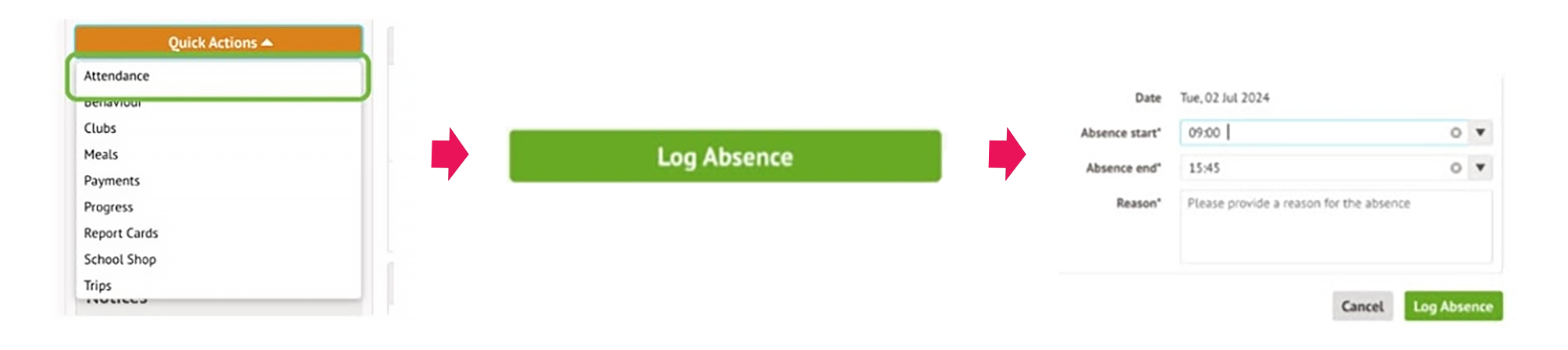
This is an important reminder that it is a parent/guardian’s key responsibility to report your child’s absence due to illness, urgent appointments or other reasons by 8.30am on the first day of absence and every subsequent day thereafter. Our preferred method for reporting absence is using the Arbor Parent Portal App (instructions shown below). Absences can also be reported calling the 24hr school absence line on 01582 314800 or email absence@kwschool.co.uk
All absence reports should be received by 8.30am at the latest, on the first day of absence and every subsequent day thereafter.
- Please provide your child’s name and tutor group
- Please give as much detail as possible for the reason of absence, avoiding using terms such as ‘unwell’ or ‘under the weather’
If you fail to contact the school to inform us of your child’s absence, or fail to respond to our attempts to contact you, this will be referred to our safeguarding team who may consider it appropriate to complete a safe and well check. The absence may also be classified as an unauthorised absence which may trigger the school’s attendance procedures.
When staff from both the attendance and safeguarding team take time out of their day to chase families, it detracts from the support we can offer to students in school.
Where possible, please give plenty of notice for any planned absence, for example hospital appointments, by using the Arbor parent portal app (on the day appointments) or emailing absence@kwschool.co.uk.
If you wish to discuss anything further regarding attendance matters, then please contact Chrissy Dicks or Katrina Linehan, Attendance Managers via the absence email address detailed above.
If you feel you would like support with your child’s attendance or well being, please do not hesitate to contact their Head of Year.
Click here to view the attendance page on the website.
Click here to view the school’s attendance policy.
Reporting Absences on Arbor Parent Portal APP – Guide
In order to report absence through the Arbor Parent Portal APP, go to the home page of the Arbor app.
To record an absence, click on the Quick Actions button and then click Attendance
Chrissy Dicks & Katrina Linehan, Attendance Managers